The Hypervision SDK is a high-performance library for building hyperspectral imaging applications — from offline file processing and spectral analysis to live camera capture and production pipelines. The core is written in Rust for performance and safety, and is used primarily through its Python bindings. It unifies camera control, interleave management, and memory-efficient data processing into a single developer interface, and serves as the engine powering the Hypervision Explorer.
For an overview of how the SDK and Explorer fit together, see HV Explorer & HV SDK.
HV SDK v1.0 is now available with a unified interface across file, camera, and lab scanner workflows.
What's included in v1.0:
-
Transparent interleave handling: Load, operate on, and save data without managing interleave types manually — the SDK handles conversions where needed.
-
Unified file and live stream interface: Develop and test pipelines against recorded files, then switch to a live Hypervision camera or Hyperscan Lab scanner by changing the source — no code changes required.
-
scikit-learn compatibility: Classifiers and regressors from scikit-learn work directly with SDK outputs, making it easy to integrate standard ML workflows.
-
Continued development: The HV SDK is actively maintained with improvements added as customer workflows and use cases evolve.
-
Roadmap: Development will focus on benchmarking and targeted performance improvements across the pipeline.
- Environment: Python 3.10
- Architecture: x86_64 / ARM64 (Linux & Windows)
- RAM: 8GB Minimum (16GB recommended for high-throughput live capture)
Access the deep-dive technical references here:
Key Developer Advantages
Memory Efficiency: Lazy Operations & Streaming
Hyperspectral datasets are among the most memory-intensive in modern imaging. The HV SDK is architected to eliminate the "RAM Wall" that typically halts HSI workflows.
-
The 8x Memory Expansion: Hyperspectral cubes are massive — a raw cube from the HV1700 often exceeds 1GB in format. When using these cubes in conventional processing tools, memory usage can grow rapidly when performing just a few operations on the initial data. Type conversions to double-precision floats cause each cube to take 8x the amount of memory, transformations such as matrix-multiplication typically double memory usage temporarily, and in general, a lot of processing time is wasted moving and copying memory.
-
Full Lazy Architecture: The HV SDK utilizes a "Full Lazy" approach. Data is only fetched from the disk and processed in small slices when a specific operation (like plotting a spectrum or running a classifier) requires it, leaving RAM usage low and CPU utilization high.
-
Streaming Computation: Operations are piped together at the library level. This minimizes the creation of intermediate, large-scale arrays in RAM, keeping the application's memory overhead nearly constant regardless of the datacube size.
-
Benchmark Proven: As shown in the comparison below, while standard NumPy-based loading scales linearly with file size (leading to 6GB+ usage for a single cube), the HV SDK maintains a negligible memory footprint ( 11MB) by only "resolving" data as needed.
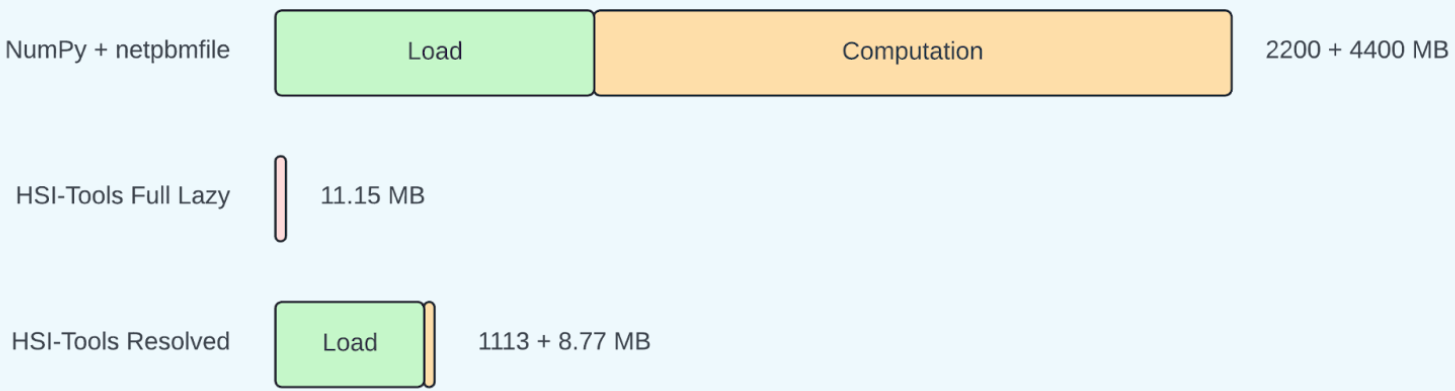
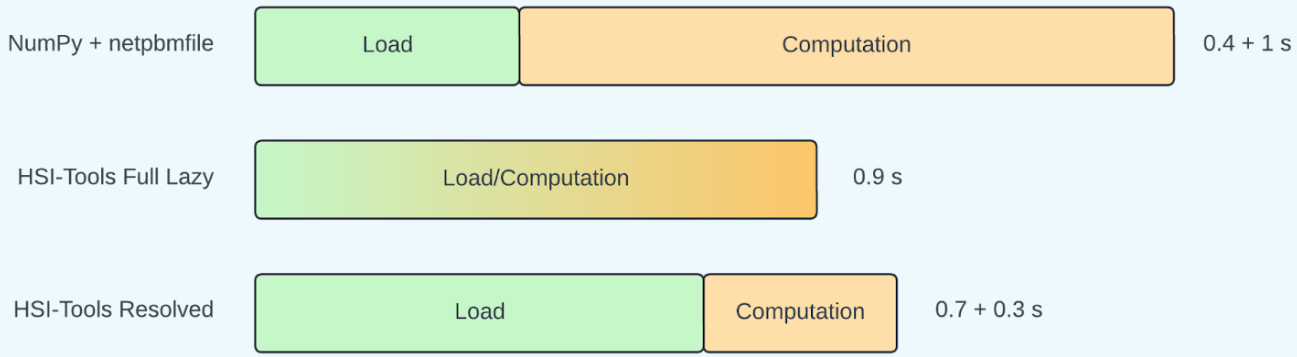
The HV SDK's Full Lazy mode maintains high performance with a fraction of the memory required by traditional HSI tools.
Universal Data & Camera Interface
The SDK abstracts the hardware and file-system complexity, allowing developers to write code once and deploy it across different data sources.
-
Unified Stream Interface: The SDK treats live Hypervision cameras and recorded files identically. This allows you to develop and debug your entire workflow using a "Simulated Camera" (loading from a file) and switch to the physical hardware by simply changing the source address.
-
Interleave Agility: The SDK makes it easier to operate on data without having to worry about the interleave type. It also provides high-performance functions to efficiently transform between BIP, BIL, and BSQ interleave types, allowing memory access to be optimized for specific tasks.
-
Broad Format Support: Native, high-speed I/O for PAM, ENVI and TIFF formats, ensuring compatibility with both qtec and third-party ecosystems.
From HV Explorer to SDK Pipelines
A common workflow is to prototype interactively in HV Explorer, then reproduce the successful operation chain in Python. The same ideas map directly: open a datacube, add calibration and preprocessing steps, inspect a band or spectrum, and only load data when the result is requested.
import qtec_hv_sdk as hs
from qtec_hv_sdk.preprocessing import make_reference
from qtec_hv_sdk.preprocessing import reflectance_calibration
from qtec_hv_sdk.preprocessing import snv

img = hs.open("sample.hdr")
dark = hs.open("dark_ref.hdr")
white = hs.open("white_ref.hdr")

# Build a lazy pipeline similar to an HV Explorer workflow.
dark_ref = make_reference(dark)
white_ref = make_reference(white)
reflectance = reflectance_calibration(img, white_ref, dark_ref, clip=True)
processed = snv(reflectance)

# Data is computed only when consumed.
band_120 = processed.array_plane(120, hs.bands)
arr = processed.to_numpy_with_interleave(hs.bip)
See the Usage Guide and HV SDK examples for current API details and runnable versions of these workflows.
Cross-Language Integration
While the core is built in Rust for maximum safety and speed, we provide high-level bindings for the most common development environments:
-
Python (Full Support): Our primary focus. These bindings track core development closely, providing a "Pythonic" interface to the high-performance Rust backend.
-
C/C++ (Stable/Limited): Optimized for integration into existing industrial frameworks. Updates are prioritized based on customer requirements.
Support
For reporting bugs or requesting assistance, write an email to: support@qtec.com
See also the Support section.